
Outschool classrooms are creative places filled with ideas that inspire friendships built on common interests. But until recently, it’s been difficult for learners to have conversations with their classmates in an Outschool classroom. That’s why we’re excited to announce the addition of @mentions, a new feature that makes it easier for learners and teachers to connect and learn with the Outschool classroom.
Learners and teachers can now use an @mention to send learners an email notification of your comments.
There are two ways to @mention a learner:
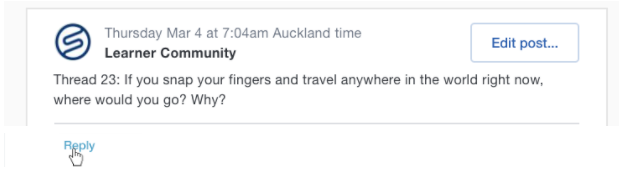
- Simply reply to a classroom comment by clicking the new ‘Reply’ function. Their @mention will auto-fill into your comment and they’ll get an email notification when you reply.
2. Type in the @ symbol for learner names and @mentions to auto-complete. Once you type the @ symbol, a list of the section’s enrolled learners will appear in a drop-down menu. Click on a learners’ name, and it will fill in the text box with an “@” symbol prepended and bold.
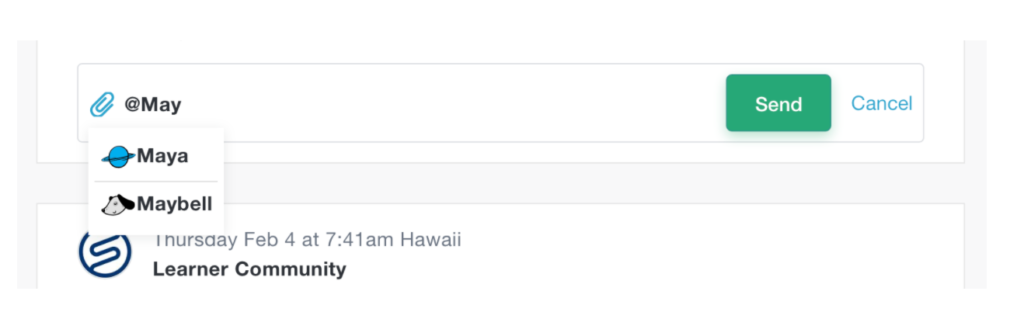
An @name that does not match anyone in the class won’t be bolded.
Email Notifications
Learners will get email notifications of activity on classroom discussions. And anyone who’s participated in a thread with a comment or who’s been tagged in a thread will get an email notification when somebody responds to that thread.
You’ll still be able to manually delete comments as needed. Stay tuned as we look forward to rolling out more features to improve the classroom experience.
Happy Teaching!